How to Send Your Resume Using Email (With Samples & Pro Tips)
Emailing your resume seems simple, but it's a place many job seekers slip up, even experienced professionals. Whether a company asks for a resume by email or you’re reaching out directly, a polished approach makes all the difference. When you send your resume the right way, you stand out, show your professionalism, and increase your odds of hearing back.
In this article, we’ll break down everything you need to know about sending your resume via email, including:
- Simple steps to get it right
- Common mistakes to avoid
- Professional email samples for any role or experience
- Follow-up advice that will help your chances
Why Email Your Resume in an Age of Online Applications?
Yes, it’s true that job applications are mostly online or automated now. But it’s also true that emailing a resume is still a practice that’s alive and well. Here’s why:
- Many roles, especially in smaller companies, through referrals, or even local job boards, still ask you to email your application documents directly.
- A smart, direct email will often get you seen faster than a form submission will.
- Taking this route can be a sign of initiative and can help you beat ATS (Application Tracking System) algorithms.
Example: When Sarah landed her first marketing role, her emailed resume stood out to the hiring manager because she’d written a clear subject line, attached a tidy PDF, and kept her message focused.
Tip: We have a guide on how to prepare a fully ATS-friendly resume.
Getting Ready: What You Need Before You Hit Send

A little preparation will go a long way, especially when your first impression is digital.
Before you email your resume, take a moment to make sure all your documents are polished and ready to go. That means crafting an email subject line that conveys the message you want to convey and double-checking that your resume and cover letter are exactly the way you want them to be.
Is your resume free from typos or formatting errors, and have you saved it in the right file type? Most employers prefer PDF because they maintain the original format and they’re usually compatible with applicant tracking systems (ATS), but some employers may request something else. Are your file names clear, professional looking, and under 2MB? Vague filenames might mean your documents get lost in someone’s downloads folder.
Checklist Before Emailing Your Resume
- Subject line is clear and specific
- Resume and cover letter are final and named professionally
- Files are saved as PDF unless otherwise specified
- File is sized under 2MB
- Recipient’s name and email address are spelled correctly
Tip: If you need to take a step back and address your overall resume writing skills, make sure you include that in your checklist.
Crafting the Perfect Resume Email
Okay, let’s get to the practicalities. Here’s how to ensure your application doesn’t get lost or, even worse, ignored.
1. Write a Stand-Out Subject Line
Imagine you’re a busy recruiter with hundreds, maybe even thousands, of resume applications sitting in your inbox. You don’t want to make more work for yourself, so you’ll just delete anything with a vague or nonsensical subject line. Asking about a specific role? Clearly craft an email subject line for the job inquiry.
What does that mean for you, the person sending off their resume via email? You want to make it easy for that recruiter to see who you are and why you're writing.
- Example: Marketing Coordinator Application - Jennifer Morgan
- Example: Referral from Mike Carter: Sales Associate Resume - Chris Hampton
- Avoid: Anything vague. Don’t use a subject line that just states Resume or Job Application.
2. Start Strong With the Right Greeting
Use local business etiquette. So if you’re in the U.S. or Canada:
- Consider saying something like Hi [First Name], or Dear [First Name Last Name].
- If you can’t find or haven’t been provided with a name, Hello Hiring Manager will work.
3. Short Introduction
Get right to the point in one or two sentences:
Example:
Example:
4. Mention the Role and Source
Let the recipient know you’re not just sending out copy-pasted mass email applications by clearly stating the role you’re applying for and where you found the job. Your email should be as tailored as your resume.
Example:
5. Value-Driven Body
In no more than one or two lines, explain why you’re the right person for the job. Be as specific as possible.
Example:
6. Attachments and Sign-off
Be clear that you’ve attached your resume and cover letter.
Example:
I’ve attached my cover letter and resume for your review. Thank you for your time and consideration.
Best regards,
Jennifer Morgan
LinkedIn.com/in/jennifermorgan (optional)
The Anatomy of a Great Job Application Email
For the sake of clarity, let’s break this down a bit more.
- Section - What to Include - Example
- Subject line - Job title, your name, referral (if any) - Marketing Analyst Application - Rachel Lee
- Greeting - Personalized or neutral, but respectful - Hello Hiring Manager,
- Intro line - Who you are, why you’re writing - I’m pleased to submit my application for…
- Why you’re a fit - Skills/experience, tailored to the job - I bring five years of retail management experience..
- Attachments section - Highlight your resume and cover letter (if you’re providing one) - Attached are my cover letter and resume for review
- Closing - Thanks, and your signature line - Best regards, Rachel
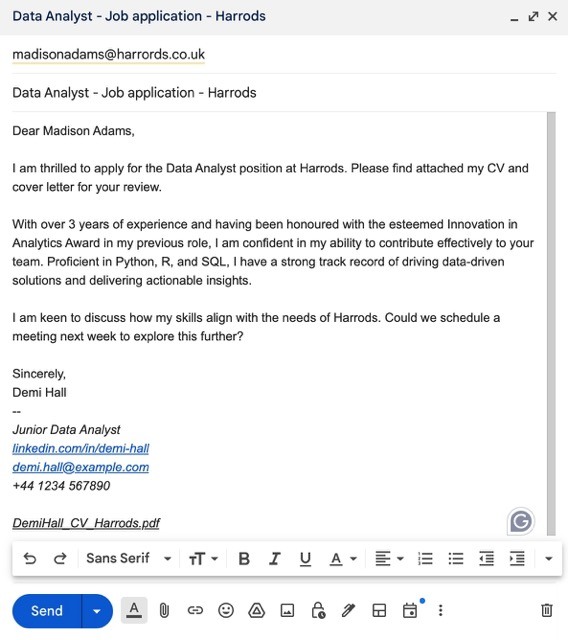
Job Application Email Templates & Samples

Sample 1: Entry-Level Seeking First Role
Subject: Customer Service Assistant Application - Emily Nguyen
Hi Hiring Manager,
I’m excited to apply for the Customer Service Assistant position at ABC Corp that was posted on LinkedIn. As a recent graduate with internship experience in retail and strong people skills, I’m eager to support your team.
My resume (attached) highlights my communication strengths and problem-solving abilities. Thank you for your consideration!
Best,
Emily Nguyen
Sample 2: Experienced Professional
Subject: Operations Manager Resume - Micheal Chan
Hello [Hiring Manager Name],
I’m submitting my application for the Operations Manager role at [Company], found on Indeed. With over a decade in logistics and a record of boosting efficiency, I’m confident I would contribute to your team.
I’ve attached my resume and cover letter for your review and am happy to provide references upon request.
Thank you for your time,
Micheal Chan
Sample 3: Networking Referral
Subject: Referral from Mia Patel - Marketing Specialist Application
Hi [Hiring Manager Name],
Mia Patel suggested I contact you about your Marketing Specialist opening. With three years of experience in digital campaigns and a proven ROI track record, I’m excited about what [Company] is building.
I’ve attached my resume and would love to talk further. Thank you for considering my application.
Best regards,
Sarah [email protected]
Email Subject Lines for Job Inquiries
What if you’ve got to the point where you have to be proactive? You’re not responding to a posted role or taking advantage of a referral. You’re out there actively searching, asking companies if they have any positions available. Well, when you’re emailing a company and inquiring about job openings, your email subject line has to work for you, not against you.
Here are some subject line examples for enquiries:
- Job Inquiry: Experienced Graphic Designer Interested in Opportunities at [Company]
- Seeking Opportunities: Marketing Professional Open to Joining [Company]
- Interested in Future Openings: IT Support Specialist Application
- Proactive Application: Finance Associate Interested in Joining Your Team.
Note that a strong subject line for a job inquiry should quickly convey your intent and relevant details about your background. Start with a phrase like Job Inquiry or Seeking Opportunities, then follow up with your job title or field. Always mention the company name if you can, as this will indicate genuine interest, not a mass mailing.
Email Format Tips for Sending Resumes
The way your email looks is almost as important as what it says. A clear, well organized message shows that you’re a professional, and that you respect the reader's time. Good formatting makes your email easy to read on any device and helps ensure nothing gets lost or overlooked.
Keep it simple, consistent, and polished by following these quick tips:
- Always use plain fonts (Arial, Calibri, Times New Roman, etc.)
- Keep your paragraphs short (1 - 3 sentences per paragraph)
- Use proper spacing, and avoid walls of text
- Re-read/proofread before sending so you catch any errors
Before and After Sample
Before (Bad):
Attaching my resume. Let me know if you’re interested. Sent from my iPhone.
After (Good):
Hi Ms. Jenkins,
I am applying for the Administrative Assistant role at BlueSky, as discussed at the career fair. My resume is attached. Thank you for considering my application!
Best,
Alex Sheppard
Common Mistakes and How to Avoid Them
Even the most qualified candidates can miss out on opportunities because of small, preventable errors made when sending their resume by email. By knowing what to watch for, you can ensure your message comes across as polished and professional.
Here are some of the most common pitfalls job seekers face, and how to avoid them:
1. The Forgotten Attachment
- Mistake: No file attached.
- Fix: Double-check before clicking send, or if your mail program has the feature, turn on attachment reminder prompts.
2. Vague or Generic Subject Lines
- Mistake: Using something like Resume or Job Application only.
- Fix: Always include the job title and your name.
3. Overly Casual or Informal Tone
- Mistake: Hey, I need a job. Here’s my resume.
- Fix: Use a friendly yet professional tone. For example:
Hi [Hiring Manager’s Name],
I’m reaching out to express my interest in potential opportunities at [Company]. I’ve attached my resume for your review, and I would love to discuss how my experience can benefit your team. Thank you for your time and consideration!
4. Huge or Poorly Formatted Files
- Mistake: 8MB of graphics-heavy resumes, or odd formats.
- Fix: PDF under 2MB, clean design.
5. Overly Long or Off-Topic Emails
- Mistake: Your life story in the body of the email.
- Fix: Keep everything focused on the role and your main strengths.
Pro Tips for Job Applications That Get Noticed
A strong resume email isn’t just about avoiding mistakes, it’s also about taking a few extra steps to stand out from the crowd. Here are some quick pro tips that will help you make a memorable impression and increase your chances of landing an interview:
- Personalize every email. Mention the company or job title right upfront.
- Follow up politely. Wait 5-7 business days, then send a brief follow-up, e.g.: Hi [Name], just checking to see if you had a chance to review my application. Please let me know if you need anything else from me. Thanks so much!
- Do not harass with repeated follow-ups. The more you do this, the more you decrease your chances of ever getting a response.
- Don’t use read receipts. They can come across as being pushy.
- Add a LinkedIn link. They’re simple, effective, professional, and can help recruiters connect.
- Never email your resume from an unprofessional account. [email protected] is great. [email protected]? Not so much.
What Not To Do:
- Don’t send the same email to everyone using something like To Whom it May Concern.
- Don’t paste your entire resume into the body of your email.
- Avoid quirky font colors and emojis.
Is Resending Your Resume Ever Appropriate?

You’re done. You’ve double-checked everything, so you hit send. And seconds later, you realize you made a mistake. Should you resend your resume?
Here’s the thing. We all make mistakes. Books are published with typos, and they go through an entire team before getting printed. So if your error is something minor—and buried in the body of your email—you probably shouldn’t draw attention to it by making a big deal of it. For example, you typed “if” instead of “is”. Take a deep breath and let it go.
What if you’ve added incorrect info or you forgot to add your resume? Then yes, you want to resend your application with an explanation. It’s also a good idea to make it clear in your subject line that this is an updated email.
- Example: Updated: Customer Service Assistant Application - Emily Nguyen
ATS Systems: What They Mean for Your Job Application Email
Applicant Tracking Systems (ATS) are software tools that many companies use to screen and organize job applications, even when you email your resume directly. They scan your documents for keywords and formatting, and if your resume doesn’t fit some predetermined criteria, they may just filter it out—meaning human eyes never see your resume!
Here are a few simple adjustments you can make to ensure your resume gets past the bot:
- File format: PDFs work best unless the company requests Word (.docx) format. If they have an older ATS, it might struggle with PDF format. Always use the requested file format.
- Formatting: Never use tables, graphics, headers & footers, or unusual fonts.
- Simple is better: Use clear headings like Experience, Education, etc.
- Why it matters: If an ATS can’t read your resume, it will probably be rejected right there.
Pro Tip: Our resume builder ensures ATS-friendly formatting!
Final Thoughts
The way you send your resume matters. A few simple tweaks like clear subject lines, polished file names, and well written messages can help you stand out, even before anyone sees your resume. Remember, it’s about making a busy recruiter’s job easier, not harder. Making it harder guarantees you get ignored!
FAQs
1. What is the seven second rule in a resume?
Recruiters spend an average of seven seconds scanning your resume before deciding if it’s worth a closer look.
2. Is it okay to email a resume?
Yes! Unless an employer is using a platform like Indeed, that is the preferred method.
3. What are the three Cs of resume writing?
Clear, Concise, and Correct. Your resume should be easy to read, free of errors, and tailored to the job.
4. How do you introduce yourself in an email when sending a resume?
In one or two sentences, state your name, the job you’re applying for, and a quick bit of context. Context could be how you found the role or a relevant qualification.
5. How do I say I’m sending my resume?
Suggestions: I have attached my resume for your consideration, or my resume is included for your review.